Fusion 360 蜂窝镂空草图脚本:参数化生成 200×200mm 六边形阵列
一段 Fusion 360 Python 脚本,在草图平面生成 200×200mm 六边形蜂窝阵列:外接圆半径 5mm、壁厚 3mm,参数集中在脚本开头,改两个数即可调整孔径与密度。
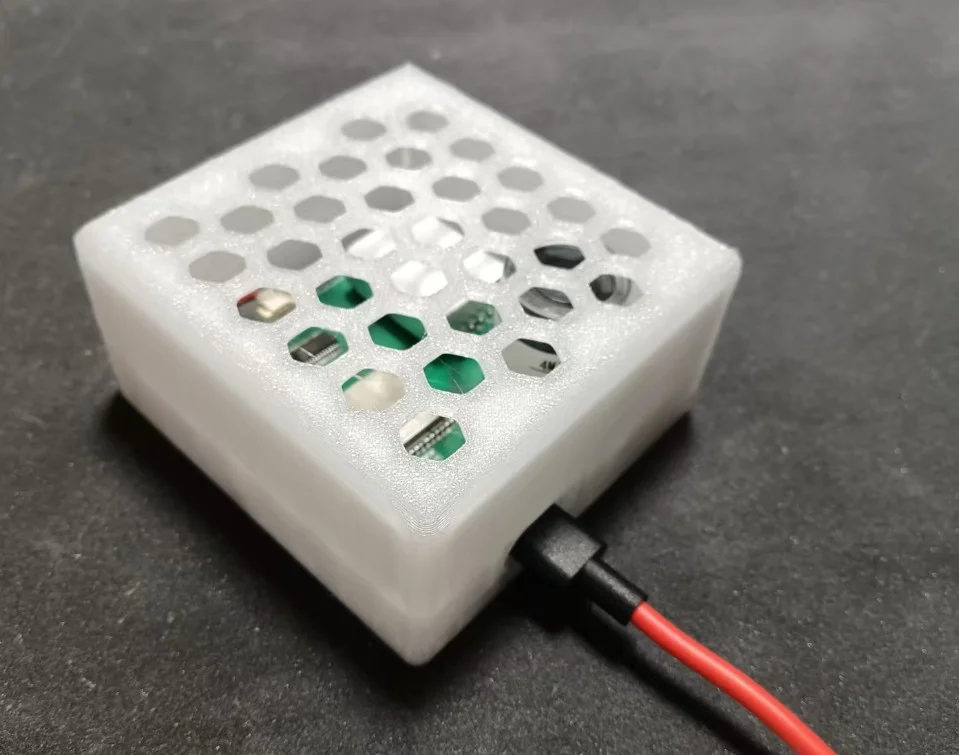
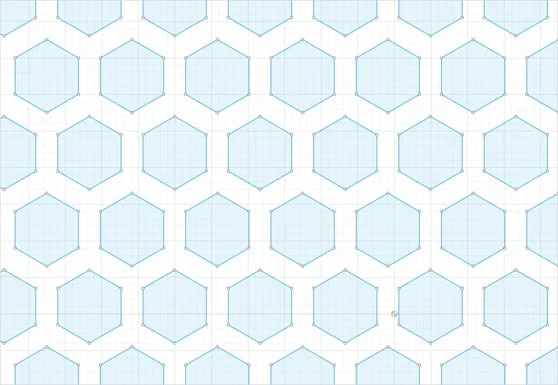
用法二选一:
- 在 Fusion 360「工具 → 附加模块 → 脚本」中运行,或导入下方 DXF,用于外壳镂空、散热孔、通风面板。
- 把脚本发给 AI,通过 Fusion MCP (右上角用户图标-首选项-常规-API-Fusion MCP服务器) 直接帮你画。
import adsk.core, adsk.fusion, math

def run(_context: str):
    app = adsk.core.Application.get()
    design = adsk.fusion.Design.cast(app.activeProduct)
    root = design.rootComponent

    # ============================================================
    # 参数配置 — 按需修改这里
    # ============================================================
    R          = 0.5   # 外接圆半径 (cm),5mm → 改成 0.4 即 4mm
    gap        = 0.3   # 孔间壁厚 (cm),3mm → 改成 0.2 即 2mm
    size_x     = 10.0  # 画布半宽 (cm),10cm → 总宽 200mm
    size_y     = 10.0  # 画布半高 (cm),10cm → 总高 200mm
    sketch_name = 'HexTile_200x200'
    # ============================================================

    apothem = R * math.sqrt(3) / 2   # 内切圆半径

    col_spacing = 2 * apothem + gap  # 列间距 (x 方向)
    row_spacing = 1.5 * R + gap      # 行间距 (y 方向)

    x_min, x_max = -size_x, size_x
    y_min, y_max = -size_y, size_y

    margin_x = apothem + gap / 2
    margin_y = R + gap / 2

    # 在 XY 平面新建草图
    sketch = root.sketches.add(root.xYConstructionPlane)
    sketch.name = sketch_name
    lines = sketch.sketchCurves.sketchLines

    # 外框 200×200mm
    corners = [
        adsk.core.Point3D.create(x_min, y_min, 0),
        adsk.core.Point3D.create(x_max, y_min, 0),
        adsk.core.Point3D.create(x_max, y_max, 0),
        adsk.core.Point3D.create(x_min, y_max, 0),
    ]
    for i in range(4):
        lines.addByTwoPoints(corners[i], corners[(i + 1) % 4])

    # 六边形蜂窝填充(flat-top,奇数行偏移半列)
    count = 0
    row = 0
    cy = y_min + margin_y
    while cy + R <= y_max - gap / 2:
        offset_x = col_spacing / 2 if (row % 2 == 1) else 0.0
        cx = x_min + margin_x + offset_x
        while cx + apothem <= x_max - gap / 2:
            pts = []
            for k in range(6):
                angle = math.radians(30 + 60 * k)  # flat-top 方向
                pts.append(adsk.core.Point3D.create(
                    cx + R * math.cos(angle),
                    cy + R * math.sin(angle),
                    0
                ))
            for k in range(6):
                lines.addByTwoPoints(pts[k], pts[(k + 1) % 6])
            count += 1
            cx += col_spacing
        cy += row_spacing
        row += 1

    print(f'Done: {count} hexagons')
    print(f'R={R*10:.1f}mm  gap={gap*10:.1f}mm  '
          f'col={col_spacing*10:.2f}mm  row={row_spacing*10:.2f}mm')
    app.activeViewport.fit()