WCH CH585M 上的边缘AI、TFLite Micro 移植全过程
把本文链接丢给 AI 代理即可复现全部步骤。 全文唯一需要人类操作的地方:打开一个 GitHub 网页,点击 Create codespace。其余全部由 AI 代理通过
gh命令自动完成。
想象一下:一个几块钱的 MCU,不需要网络、不需要 Linux、不需要 MPU,就能本地运行神经网络——关键词唤醒、手势识别、振动异常检测、传感器数据拟合。设备端推理意味着零延迟、离线可用、数据不出设备、功耗低到可以用电池跑几年。
这就是 TensorFlow Lite Micro(TFLM)要做的事——目标是在只有几十 KB RAM、几百 KB Flash 的芯片上跑 AI 推理。
WCH CH585M 是一颗只要几块钱的 RISC-V 芯片——448KB Flash、128KB RAM,带 BLE。如果能在它上面跑 TFLM,就意味着一大批低成本 RISC-V 设备都有了边缘 AI 的可能性。
这篇文章记录把 TFLite Micro 真正烧进 CH585M 的过程:用 MRS IDE 编译,串口输出推理结果,最终在真实硬件上跑通 sin 函数拟合 demo。
本文用的 sin 模型是用 TensorFlow 训练的一个三层 MLP(1→10→5→1),输入 x 输出 sin(x)。模型的训练过程见《ESP32-S3 上使用 ESP-NN 加速 TFLite Micro sin 推理》。完整工程代码在 GitHub。
硬件与工具链
| 项目 | 说明 |
|---|---|
| MCU | WCH CH585M,RISC-V RV32IMC,448KB Flash,128KB RAM |
| 调试器 | WCH-LinkE(板载) |
| 串口 | UART0 — PA14 (TX) / PA15 (RX) @ 115200 |
| IDE | MRS2(MounRiver Studio 2,基于 Eclipse CDT) |
| 工具链 | RISC-V Embedded GCC 12.2.0,prefix: riscv-wch-elf- |
| C 库 | newlib-nano |
第一步:获取 TFLite Micro 源码
TFLM 自带官方脚本 create_tflm_tree.py,自动生成所需的完整目录树。已在 GitHub Codespace 上实测通过。
人类操作(唯一需要你动手的地方)
打开 tensorflow/tflite-micro,点击 Code → Codespaces → Create codespace on main。等 Codespace 启动(约 1-2 分钟),然后把会话交给 AI 代理。如果你使用的 AI 代理能控制浏览器,这一步 AI 可以代劳。
AI 代理操作
# 列出当前 Codespace
gh codespace list

# SSH 进去运行官方脚本
gh codespace ssh -c <codespace-name> -- "\
  pip install Pillow && \
  python3 tensorflow/lite/micro/tools/project_generation/create_tflm_tree.py /tmp/tflm-output && \
  find /tmp/tflm-output -name '*.cc' | wc -l"
# 输出应为 202

# 拉取生成的文件到工程目录
gh codespace cp remote:/tmp/tflm-output/tensorflow . -c <codespace-name>
gh codespace cp remote:/tmp/tflm-output/third_party . -c <codespace-name>
脚本生成的文件(忽略 signal/,它是信号处理库,与推理无关):
工程目录/
├── tensorflow/     # TFLM 核心源码(202 个 .cc + 271 个 .h)
└── third_party/    # flatbuffers, gemmlowp, ruy(纯头文件)
如果本机有 Linux/WSL,直接 clone 仓库后跑
python3 create_tflm_tree.py /tmp/tflm-output即可,不需要 Codespace。
第二步:集成到工程
拿到 tensorflow/ 和 third_party/ 后,需要做 4 件事。
删除冲突文件(9 个)
脚本生成的默认平台实现与我们要自己写的冲突:
tensorflow/lite/micro/debug_log.cc       ← 与 tflite_port/debug_log.cc 冲突
tensorflow/lite/micro/micro_time.cc      ← 与 tflite_port/micro_time.cc 冲突
tensorflow/lite/micro/system_setup.cc    ← 与 tflite_port/system_setup.cc 冲突
tensorflow/lite/micro/test_helpers.cc    ← 测试辅助,不需要
tensorflow/lite/micro/test_helper_custom_ops.cc
tensorflow/lite/micro/fake_micro_context.cc
tensorflow/lite/micro/mock_micro_graph.cc
tensorflow/lite/micro/recording_micro_allocator.cc
tensorflow/lite/micro/hexdump.cc
新增 include 路径(2 个)
脚本生成的 third_party 目录结构比手动复制多了一层:
| 路径 | 原因 |
|---|---|
third_party/flatbuffers/include |
flatbuffers 在 include/ 子目录下 |
third_party/ruy |
ruy 路径多了一层 ruy/ |
新增编译宏(4 个)
newlib-nano 缺少部分 C++ 标准数学函数:
TF_LITE_STATIC_MEMORY               # 禁用动态内存
TF_LITE_USE_GLOBAL_CMATH_FUNCTIONS  # 缺少 std::round / std::expm1
TF_LITE_USE_GLOBAL_MAX              # 缺少 std::fmax
TF_LITE_USE_GLOBAL_MIN              # 缺少 std::fmin
Makefile 用通配符自动发现文件
不再手动列举文件名,用 $(wildcard ...) 自动匹配:
TFLM_SRCS := $(filter-out \
    %/debug_log.cc %/micro_time.cc %/system_setup.cc \
    %/test_helpers.cc %/test_helper_custom_ops.cc \
    %/fake_micro_context.cc %/mock_micro_graph.cc \
    %/recording_micro_allocator.cc %/hexdump.cc, \
    $(wildcard tensorflow/lite/micro/*.cc \
               tensorflow/lite/micro/arena_allocator/*.cc \
               tensorflow/lite/micro/memory_planner/*.cc \
               tensorflow/lite/micro/kernels/*.cc \
               tensorflow/lite/micro/tflite_bridge/*.cc \
               tensorflow/lite/core/api/*.cc \
               tensorflow/lite/core/c/*.cc \
               tensorflow/lite/kernels/*.cc \
               tensorflow/lite/kernels/internal/*.cc \
               tensorflow/lite/kernels/internal/reference/*.cc \
               tensorflow/compiler/mlir/lite/core/api/*.cc \
tensorflow/compiler/mlir/lite/schema/*.cc))不用担心文件太多——链接器 --gc-sections 会自动丢弃未使用的代码段。编译了全部 120+ 个算子内核后,最终固件 text 段只有 72KB。
第三步:写三个平台抽象函数
TFLite Micro 把平台相关部分收敛到三个函数。这是移植中唯一需要手写的 C++ 代码。
DebugLog
// tflite_port/debug_log.cc
#include "tensorflow/lite/micro/debug_log.h"
#include <cstdio>

extern "C" void DebugLog(const char* format, va_list args) {
  vfprintf(stderr, format, args);
}

extern "C" int DebugVsnprintf(char* buffer, size_t buf_size,
                               const char* format, va_list vlist) {
  return vsnprintf(buffer, buf_size, format, vlist);
}
TFLM 所有日志走 DebugLog()。printf 已被 CH58x HAL 层重定向到 UART(_write() 在 CH58x_sys.c 中实现)。
InitializeTarget
// tflite_port/system_setup.cc
#include "tensorflow/lite/micro/system_setup.h"

namespace tflite {
void InitializeTarget() {
  // 时钟和 UART 已在 main() 中初始化
}
}
GetCurrentTimeTicks
// tflite_port/micro_time.cc
#include "tensorflow/lite/micro/micro_time.h"

extern "C" { extern uint32_t SystemCoreClock; }

namespace tflite {
uint32_t ticks_per_second() {
  return (SystemCoreClock / 1000) ? (SystemCoreClock / 1000) : 1;
}
uint32_t GetCurrentTimeTicks() {
  volatile uint32_t dummy = 0;
  return dummy;
}
}
不用引用 CH58x_common.h,用 extern "C" 声明 SystemCoreClock 即可,避免引入不必要 HAL 依赖。
第四步:用 MRS IDE 创建工程
- 打开 MRS IDE,创建一个 CH585M 空白工程
- 告诉 AI 代理工程路径
- AI 代理将
tensorflow/、third_party/、tflite_port/、src/main.cc、model_data.h放入工程
MRS IDE 使用 Eclipse CDT 的 .cproject 管理编译选项。AI 代理需在 IDE 中配置以下项(或直接编辑 .cproject 文件):
C++ 编译选项
| 配置项 | 值 |
|---|---|
| C++ 标准 | gnu++17 |
| 异常 | -fno-exceptions |
| RTTI | -fno-rtti |
| 静态对象线程安全 | -fno-threadsafe-statics |
预处理器宏
| 位置 | 宏 | 原因 |
|---|---|---|
| C++ | TF_LITE_STATIC_MEMORY |
禁用动态内存 |
| C++ | TF_LITE_USE_GLOBAL_CMATH_FUNCTIONS |
newlib-nano 缺少 std::round |
| C++ | TF_LITE_USE_GLOBAL_MAX |
newlib-nano 缺少 std::fmax |
| C++ | TF_LITE_USE_GLOBAL_MIN |
newlib-nano 缺少 std::fmin |
| C | DEBUG=0 |
printf 输出到 UART0 |
DEBUG=0 决定 printf 走哪个串口。CH58x_sys.c 中的 _write() 用 #if DEBUG == Debug_UART0 选择 UART0(PA14/PA15),这是板子上唯一引出的串口。
include 路径
${workspace_loc:/${ProjName}}
${workspace_loc:/${ProjName}/StdPeriphDriver/inc}
${workspace_loc:/${ProjName}/RVMSIS}
${workspace_loc:/${ProjName}/third_party}
${workspace_loc:/${ProjName}/third_party/gemmlowp}
${workspace_loc:/${ProjName}/third_party/flatbuffers/include}
${workspace_loc:/${ProjName}/third_party/ruy}
链接器
- 链接库:
-lISP585 -lstdc++ - 链接脚本:
Ld/Link.ld - 关键:C 和 C++ 链接器都勾选 "Use float with nano printf"(
-u _printf_float)。newlib-nano 默认禁用%f格式化,不开启的话串口只输出空白。
第三方依赖
三组外部库全部由 create_tflm_tree.py 自动生成,只需添加 include 路径,不编译任何源码:
| 库 | 用途 | 路径 |
|---|---|---|
| FlatBuffers | 解析 .tflite 模型文件 |
third_party/flatbuffers/include/ |
| gemmlowp | 定点运算模板 | third_party/gemmlowp/ |
| ruy | profiling(ScopeLabel 空类) |
third_party/ruy/ |
ruy 的 instrumentation.h 自带 #ifdef RUY_PROFILER 分支,未定义该宏时回退到空类,开箱即用。
Demo 主程序
#include "CH58x_common.h"
#include "tensorflow/lite/micro/micro_interpreter.h"
#include "tensorflow/lite/micro/micro_mutable_op_resolver.h"
#include "tensorflow/lite/micro/system_setup.h"
#include "tensorflow/lite/schema/schema_generated.h"
#include "model_data.h"

namespace {

using OpResolver = tflite::MicroMutableOpResolver<3>;

TfLiteStatus RegisterOps(OpResolver& op_resolver) {
  TF_LITE_ENSURE_STATUS(op_resolver.AddFullyConnected());
  TF_LITE_ENSURE_STATUS(op_resolver.AddTanh());
  TF_LITE_ENSURE_STATUS(op_resolver.AddReshape());
  return kTfLiteOk;
}

constexpr int kTensorArenaSize = 8 * 1024;
static uint8_t tensor_arena[kTensorArenaSize] __attribute__((aligned(16)));

void RunInference() {
  const tflite::Model* model = ::tflite::GetModel(g_model_data);
  if (model->version() != TFLITE_SCHEMA_VERSION) {
    printf("Bad model version\r\n");
    return;
  }

  OpResolver op_resolver;
  if (RegisterOps(op_resolver) != kTfLiteOk) {
    printf("Op register fail\r\n");
    return;
  }

  tflite::MicroInterpreter interpreter(model, op_resolver,
                                       tensor_arena, kTensorArenaSize);
  if (interpreter.AllocateTensors() != kTfLiteOk) {
    printf("Alloc fail\r\n");
    return;
  }

  TfLiteTensor* input  = interpreter.input(0);
  TfLiteTensor* output = interpreter.output(0);

  printf("\r\n=== TFLite sin demo ===\r\n");

  float test_x[] = {0.0f, 0.5f, 1.0f, 1.5f, 2.0f, -1.0f, 3.14f};
  for (int i = 0; i < 7; i++) {
    input->data.f[0] = test_x[i];
    if (interpreter.Invoke() != kTfLiteOk) {
      printf("Invoke fail\r\n");
      return;
    }
    float y = output->data.f[0];
    printf("x=%.2f -> y=%.6f\r\n", test_x[i], y);
  }

  printf("=== Done ===\r\n");
}

}  // namespace

extern "C" int main() {
  HSECFG_Capacitance(HSECap_18p);
  SetSysClock(SYSCLK_FREQ);

  GPIOA_SetBits(GPIO_Pin_14);
  GPIOPinRemap(ENABLE, RB_PIN_UART0);
  GPIOA_ModeCfg(GPIO_Pin_15, GPIO_ModeIN_PU);
  GPIOA_ModeCfg(GPIO_Pin_14, GPIO_ModeOut_PP_5mA);
  UART0_DefInit();
  UART0_BaudRateCfg(115200);

  DelayMs(1000);
  printf("CH585M TFLite boot\r\n");

  tflite::InitializeTarget();
  RunInference();

  while (1) {}
}
要点:
MicroMutableOpResolver<3>模板参数在编译期确定数组大小,零堆分配tensor_arena[8192]用__attribute__((aligned(16)))对齐GetModel(g_model_data)不拷贝数据,只是指针 cast- UART0 映射到 PA14/PA15 需要通过
GPIOPinRemap— CH585M 的 UART0 默认不在这些引脚上
编译结果
   text	   data	    bss	    dec	    hex
71916 844 8240 81000 13c68| 区域 | 大小 | 使用率 |
|---|---|---|
| Flash (448KB) | ~72KB | 16% |
| RAM (128KB) | ~9KB | 7% |
120+ 个算子内核全部编译,--gc-sections 自动丢弃未用代码。8KB bss 段主要是 tensor_arena,实际峰值使用约 3KB。
踩坑记录
flatbuffers/flatbuffers.h找不到 — 脚本的 flatbuffers 多一层include/子目录。加-Ithird_party/flatbuffers/include。ruy/profiler/instrumentation.h找不到 — 脚本的 ruy 路径是third_party/ruy/ruy/...。加-Ithird_party/ruy。'fmax'/'fmin' is not a member of 'std'— newlib-nano 不提供这两个函数。加宏TF_LITE_USE_GLOBAL_MAX和TF_LITE_USE_GLOBAL_MIN。'round' is not a member of 'std'— 同理,加宏TF_LITE_USE_GLOBAL_CMATH_FUNCTIONS。- 串口无输出 —
_write()通过DEBUG宏选择串口。DEBUG=0= UART0,DEBUG=1= UART1。 - 串口浮点数空白 — newlib-nano 默认禁用
%f。C 和 C++ 链接器都勾选 "Use float with nano printf"(-u _printf_float),增加约 12KB code size。 FLASH_EEPROM_CMDundefined — CH58x HAL 依赖 WCH ISP 库,链接加-lISP585。
串口输出
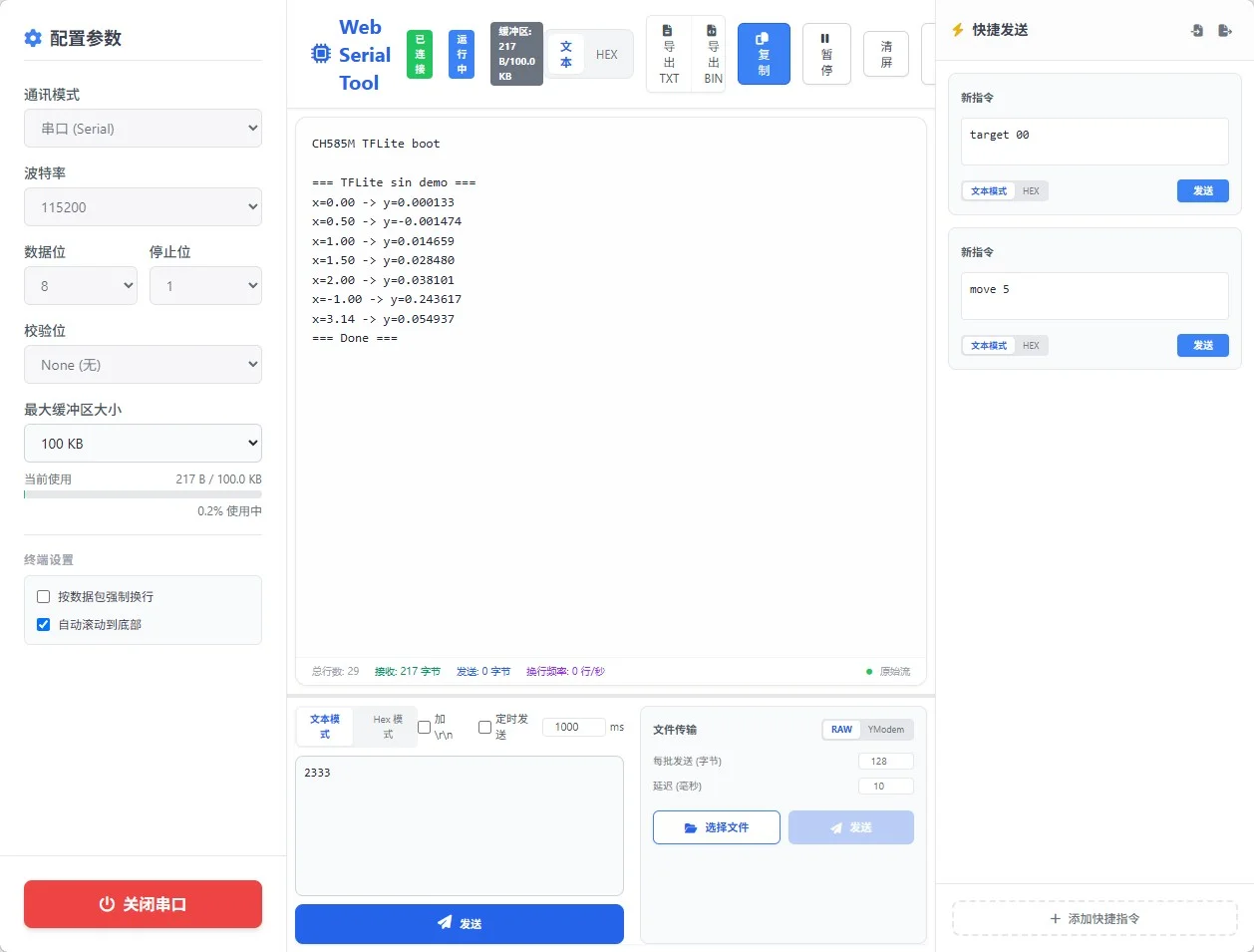
sin(0) ≈ 0, sin(1) ≈ 0.84, sin(3.14) ≈ 0,7 个测试点全部正确。
移植成本
TFLite Micro 的架构决定了移植工作量极小:
- 文件获取:
create_tflm_tree.py一把生成,AI 代理通过gh codespace全自动完成 - 集成:删 9 个冲突文件,加 2 个 include 路径、4 个编译宏、
-u _printf_float - 手写代码:只有 3 个平台抽象函数(共约 30 行)+ main.cc
- 算子:不需要手动精简,
--gc-sections自动丢弃未用代码 - 内存模型:静态 arena + GreedyMemoryPlanner,零动态分配
换模型只需改 RegisterOps() 添加对应算子注册,其余不变。